Drone video monitoring changes the documentation equation by giving project teams a consistent aerial record of site conditions over time. But the technology alone doesn't guarantee useful results. How flights are planned, how footage is captured and processed, and how video deliverables actually reach decision-makers determines whether the investment pays off.
This guide covers the complete workflow, the equipment and compliance requirements, the variables that most affect quality, and the mistakes that consistently undermine otherwise solid monitoring programs.
Key Takeaways
- Drone video monitoring uses UAVs with high-resolution cameras to document construction milestones, verify work completion, and communicate progress to remote stakeholders
- Works best on mid-to-large commercial, industrial, or multi-phase projects with owners or investors who need regular visual updates
- FAA Part 107 certification is legally required for commercial drone operations; unlicensed flights expose both operators and project owners to liability
- Success depends on consistent flight scheduling, locked altitude/flight paths, 4K minimum capture settings, and edited deliverables (not raw footage)
- The most common failure: footage gets captured but never organized, edited, or distributed in a format stakeholders can actually use
How to Conduct Drone Video Construction Progress Monitoring
Step 1: Pre-Flight Planning and Site Coordination
Before arriving on site, map the flight path to the project's key documentation targets: foundation work, structural framing, facade installation, rooftop systems, and materials staging. Every zone that needs to appear in the progress record should be assigned to a specific pass in the flight plan.
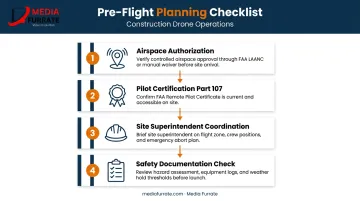
Two compliance items must be confirmed before any flight:
- Airspace authorization — use the FAA's B4UFLY app or LAANC system to confirm the site falls within authorized airspace, or that a waiver has been obtained for restricted zones
- Pilot certification — the operator must hold a valid FAA Part 107 Remote Pilot Certificate for any footage captured in a commercial or business context
Coordinate with the site superintendent before each session. Active crane operations, personnel zones, and overhead utility conflicts all affect where and when safe flight windows exist.
Document the pre-flight safety check: aircraft condition, battery charge levels, and weather minimums. This coordination determines whether the flight is usable — not just legal.
Step 2: Executing the Drone Video Capture
Flying orbital and overhead passes at a consistent altitude — typically 100 to 200 feet AGL for most construction sites — produces footage that can be directly compared session to session. Altitude consistency is non-negotiable: vary it between sessions and the comparisons lose their value.
Structure each session in two layers:
- Establishing passes — full site footprint at consistent altitude to capture overall progress
- Zone passes — systematic close-up coverage of each active work area, including completed versus in-progress sections
Record flight metadata alongside the video file. For drones that generate telemetry subtitle files (DJI .SRT files, for example), retain these with the footage for georeferencing and documentation purposes. That metadata becomes relevant if the footage is ever needed for insurance, payment disputes, or schedule verification.
Step 3: Reviewing, Editing, and Organizing Footage
Transfer footage immediately after each session. Organize files by date and zone — a simple, consistent labeling system saves significant time when you're pulling comparisons six months into a project.
Raw footage is not a deliverable. Edit each session into a progress report video of roughly 2–5 minutes that covers:
- Milestones completed since the last session
- Active work zones and current status
- Any observable discrepancies from the previous capture
Apply consistent color grading, on-screen zone labels, and date stamps. A voiceover or title card summary transforms aerial footage into a document that non-technical stakeholders — owners, investors, lenders — can interpret without a guide. Without that context, even excellent footage rarely gets used.
Step 4: Distributing Progress Videos to Stakeholders
Once footage is edited and packaged, how it reaches stakeholders matters as much as what it shows. Set the distribution format before the project begins — not after the first session is ready to send. Options include:
- Shared cloud folder (simple, accessible)
- Project management platform embedding (keeps documentation inside the existing workflow)
- Direct links sent with each update
- Live presentation at owner-architect-contractor (OAC) meetings
Weekly distribution is standard during active construction phases. Bi-weekly works during slower periods. The key is that stakeholders know when to expect updates — a reliable cadence makes the documentation part of decision-making rather than a supplemental archive.
Retain every progress video for the life of the project. Time-stamped drone footage, captured by a legally compliant operator with documented chain of custody, supports authenticity and integrity if footage is later needed for insurance claims, payment applications, or defect documentation.
What You Need Before Starting Drone Video Construction Monitoring
Equipment and Camera Requirements
The minimum viable setup for professional construction video documentation:
- 4K resolution (3840×2160) at 30fps — enterprise drones like the DJI Mavic 3 Enterprise publish this as a confirmed spec, with a 4/3 CMOS wide camera that exceeds consumer-grade sensor performance
- Gimbal-based stabilization — non-negotiable; unstabilized footage from even mild wind is unusable for documentation
- Flight time of 40+ minutes — the DJI Matrice 30 Series offers 41 minutes; the Matrice 350 RTK reaches 55 minutes, both verified by manufacturer specs
- H.264/H.265 encoding — H.264 offers broad compatibility across stakeholder devices; H.265 reduces file size for archival storage at the cost of additional editing overhead
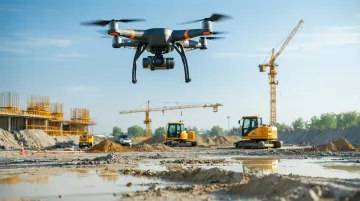
Consumer drones can fly a construction site, but shorter flight times, weaker obstacle avoidance, and reduced transmission range create operational limitations on larger sites. Enterprise platforms are built around the conditions commercial job sites actually present.
FAA Compliance and Licensing
The FAA is unambiguous: any commercial, government, or non-recreational drone operation requires the pilot to hold a Part 107 Remote Pilot Certificate. That includes footage captured for a client, footage used in a business context, and footage that ends up in a progress report.
Operating without certification carries real consequences:
- Civil penalties: The FAA has proposed $341,413 in fines against a single operator, including $182,000 for 10 unauthorized commercial flights
- Documentation risk: Non-compliant footage can become inadmissible if it's needed in a dispute or insurance claim
- Operational disruption: Violations can ground a project's monitoring program mid-construction
Working with a team that already holds Part 107 certification removes this burden entirely. Media Furrate's founder Jason Furrate is an FAA-licensed drone pilot serving construction and industrial clients across the Southeastern United States. Their footage meets compliance requirements from the first session.
Site Coordination and Safety Readiness
Before each session:
- Complete a pre-flight walkthrough with the site superintendent to identify active crane lifts, scaffolding movement, and overhead utility conflicts
- Confirm the General Contractor has been notified of the monitoring schedule
- Verify that any required insurance certificates or site access agreements are in place
These steps protect both the operator and the project owner. A superintendent who knows a drone is coming can plan around it rather than creating conflicts during the flight window.
Key Variables That Affect Drone Video Monitoring Results
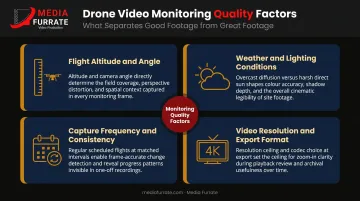
Four variables determine whether construction drone footage is professionally useful or practically worthless.
Flight Altitude and Angle
Fly too high and structural details become unreadable. Fly too low and full-site overviews are lost. The right altitude is site-specific — establish it at project kickoff and lock it for every subsequent session. Inconsistent altitude between sessions makes side-by-side comparisons visually unreliable.
Weather and Lighting Conditions
Manufacturer specs for enterprise platforms like the DJI Matrice 30 and Matrice 350 RTK list maximum wind resistance of 12 m/s. Flying above that threshold degrades stabilization even with a gimbal. Overcast flat light eliminates the shadows that reveal structural depth; harsh midday sun creates blown-out highlights that obscure detail.
Schedule sessions during early morning or late afternoon — the soft directional light at those windows produces footage with far more spatial depth than midday captures. When weather is marginal, reschedule rather than fly. Poor-condition footage can't serve as reliable documentation — stakeholders simply can't use it.
Capture Frequency and Consistency
The documentation value of drone monitoring compounds over time. A single session is just footage. Twelve sessions at consistent angles and altitude, aligned with milestone reviews, create a visual timeline that isolates exactly what changed each week and supports schedule verification. To maintain that value, every session needs to hold to the same parameters:
- Fly the same route and altitude each session
- Align captures with project milestones, not arbitrary dates
- Reschedule missed sessions promptly — gaps in the middle of a phase undermine comparisons on both sides of them
Video Resolution and Export Format
4K (3840×2160) is the functional minimum for construction documentation because it supports post-capture zooming into specific structural details without quality degradation. Lower resolution footage can't recover that detail after the fact.
Export in MP4 with H.264 for broad compatibility across stakeholder devices, or H.265 when storage is a concern. Set the export standard at project kickoff — consistent file formats across all sessions make archival and comparison straightforward.
Common Mistakes in Drone Video Construction Monitoring
These five errors show up repeatedly on job sites and in post-production workflows:
Using a pilot without a Part 107 certification on commercial job sites creates liability exposure for the project owner and produces footage that may not hold up in legal or insurance contexts.
Changing flight paths or altitude between sessions undermines progress comparisons — a repeatable orbit at a locked altitude is the foundation of any meaningful visual reference.
Flying in poor conditions instead of rescheduling is avoidable. Wind-degraded stabilization, flat overcast light, and direct-sun glare are the three most common causes of professionally unusable construction video. Schedule around them.
Delivering raw footage as the progress report places the full burden of interpretation on non-technical stakeholders, reducing how much the footage actually informs decisions. Label, date, and structure it before sharing.
Skipping an archive system from day one means footage captured without a consistent naming and folder structure becomes nearly impossible to retrieve at month six. Set the format before the first session.
Frequently Asked Questions
Do I need an FAA-licensed pilot to film construction progress with a drone?
Yes. Any footage captured for a client or used in a business context counts as commercial use under FAA rules, requiring a Part 107 Remote Pilot Certificate. Operating without one creates legal and liability exposure for both the operator and the project owner.
How often should drone video monitoring sessions be scheduled?
Weekly sessions are standard during active construction phases and align naturally with milestone reviews. Bi-weekly may suffice during slower phases. Consistency matters more than frequency. Stakeholders need a reliable cadence so updates can be meaningfully compared.
What is the difference between drone video monitoring and photogrammetry?
Drone video monitoring produces visual documentation and stakeholder communication deliverables. Photogrammetry uses overlapping still images to generate georeferenced 3D models and measurement data. Both have legitimate construction applications, but they serve different primary purposes.
Can drone video footage be used for insurance claims or construction disputes?
Time-stamped footage is commonly used to document site conditions and support payment applications or dispute resolution, provided it was captured by a legally compliant operator and the files have maintained a clear chain of custody from capture through storage.
What types of construction projects benefit most from drone video monitoring?
Mid-to-large commercial builds, industrial facilities, multi-phase residential developments, and any project with remote ownership or investor groups requiring regular visual updates. Projects where physical site access is limited or hazardous also benefit significantly.
How much does professional drone video construction monitoring cost?
Pricing varies based on project scope and logistics. Key cost drivers include:
- Site size and total flight coverage area
- Session frequency throughout the project timeline
- Deliverable type (raw footage versus edited stakeholder reports)
- Travel distance to the job site
- Compliance requirements such as airspace authorization and insurance
Contact Media Furrate at (225) 317-4233 or jason@mediafurrate.com for a project-specific consultation.