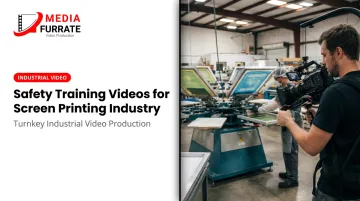
Key Takeaways
- Screen printing involves chemical, ergonomic, thermal, and electrical hazards that require structured, documented training
- OSHA's top two citations for the printing industry are Hazard Communication and Lockout/Tagout — both require dedicated video modules
- A $48,000 average cost per medically consulted workplace injury makes prevention cheaper than recovery
- Short, topic-specific video modules outperform single long orientation videos for knowledge retention
- Video-based training simplifies documentation, verification, and repeatable delivery across your workforce
Why Screen Printing Safety Training Videos Are Non-Negotiable
Screen printing shops often run multiple shifts with operators at very different experience levels. When safety training depends entirely on whoever happens to be working that day, the message changes with every delivery. A new hire trained by a rushed shift supervisor learns something different than one trained by the safety manager — and that inconsistency is where injuries happen.
Video closes that gap. Every employee gets the same information, in the same order, every time.
The Financial and Legal Stakes
According to the National Safety Council's 2024 injury cost data, the average medically consulted workplace injury costs $48,000 — a figure that includes lost wages, medical expenses, and productivity losses. That's before any regulatory penalties enter the picture.
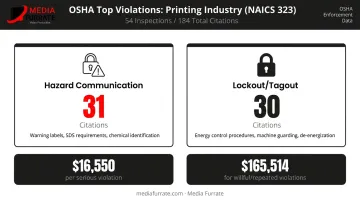
On the compliance side, OSHA's current penalty schedule sets maximums at $16,550 per serious violation and up to $165,514 for willful or repeated violations. For the printing industry specifically (NAICS 323), OSHA enforcement data from 2024–2025 shows 184 citations from 54 inspections, with Hazard Communication ranked first (31 citations) and Lockout/Tagout second (30 citations).
Those aren't obscure violations. They're the core of what a screen printing safety video must cover.
Why Video Works Better Than a Binder
Printed manuals get filed, forgotten, or never read. Video combines visuals, audio, and real-world demonstrations in a way static documents can't replicate. A well-produced training video can be paused, rewound, and reviewed before an employee touches equipment or opens a chemical container for the first time.
The practical advantages extend well beyond orientation:
- Delivers consistent messaging regardless of who's on shift or who's available to train
- Scales easily through seasonal hiring surges without scheduling a trainer each time
- Accommodates equipment changes with targeted updates rather than full reprints
- Frees up supervisors to handle questions instead of repeating the same walkthrough
The video handles the baseline. The trainer handles what comes after.
The Major Hazards Every Screen Printing Safety Video Must Cover
Screen printing combines four distinct hazard categories in a single production environment. Each one warrants its own module.
Chemical Exposure
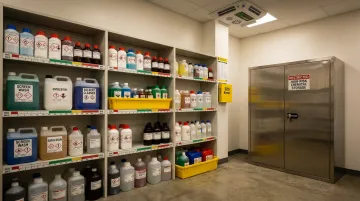
This is the highest-priority area — and the most frequently cited by OSHA. Screen printing chemicals include inks, emulsions, pallet adhesives, degreasers, and solvents, many of which carry serious hazard classifications under their Safety Data Sheets.
Three products illustrate the range of risk:
- CAMIE 380 pallet adhesive contains n-hexane, acetone, propane, and butane — classified as a Category 1 flammable aerosol with reproductive toxicity concerns
- Sodium periodate emulsion remover is classified as an oxidizing solid with acute oral toxicity — a "Danger" signal word product that can intensify fire
- Water-based emulsions like Chroma/Tech WR carry skin sensitization and reproductive toxicity classifications despite their "water-based" label
Solvent vapors from several of these products are heavier than air — acetone at 2.0, n-hexane at 3.0, and toluene at 3.1 (air = 1.0). In poorly ventilated or low-lying spaces, these vapors accumulate at breathing level. Training videos must address ventilation requirements, not just PPE.
Ergonomic Hazards
Manual press operators perform thousands of repetitive hand and wrist movements per shift. According to the National Academies' musculoskeletal disorder data, repetitive motion accounted for 98% of carpal tunnel syndrome cases in BLS-tracked data. Screen stretching, squeegee operation, and loading/unloading tasks put sustained strain on wrists, shoulders, and the lower back.
Training videos should demonstrate:
- Correct squeegee grip and stroke technique
- Workstation height adjustment for different operators
- Two-person lifting protocols for heavy screen frames
- Use of wheeled carts and padded tool handles
Equipment and Machinery Hazards
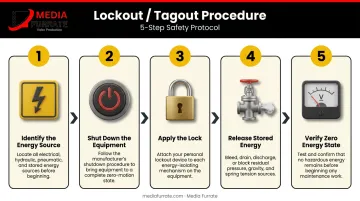
Automatic presses, flash cure units, and conveyor dryers each carry distinct risks: exposed pinch points during loading, high-temperature burn surfaces on cure equipment, and electrical hazards at every maintenance point. OSHA's Lockout/Tagout standard (29 CFR 1910.147) requires documented energy-control procedures and training for any employee who performs servicing or maintenance where unexpected startup could cause injury.
A training video should walk through the specific shutdown and lockout sequence for each piece of major equipment — not as a generic concept, but with the actual machine visible on screen. A training video should walk through the specific shutdown and lockout sequence for each piece of major equipment — not as a generic concept, but with the actual machine visible on screen.
Key steps to cover for each machine:
- De-energize all power sources before any adjustment or clearing
- Apply lockout devices and verify zero-energy state
- Document the procedure and post it at the point of use
Fire and Housekeeping Hazards
Aerosol pallet adhesives classified as Category 1 flammable carry explicit SDS warnings about heat and ignition sources. NFPA 34 covers dipping, coating, and printing processes using flammable or combustible liquids — a standard directly applicable to screen printing operations.
Housekeeping belongs in the same module. Misplaced razor blades, ink spills on smooth floors, and improperly stored chemicals are consistent causes of cuts, slips, and accidental chemical misuse. On a press floor, cleanliness isn't optional maintenance. It's how you prevent the next incident before it happens.
What to Include in a Screen Printing Safety Training Video
Organized by task and regulatory requirement:
Hazard Communication and SDS Reading
OSHA 1910.1200 requires training at initial assignment and whenever a new chemical hazard is introduced. The video should show where SDSs are stored, walk through Sections 2 (hazard identification), 8 (exposure controls/PPE), and 10 (reactivity), and demonstrate how product labels connect to SDS information.
PPE by Task
| Task | Required PPE |
|---|---|
| Ink preparation and mixing | Nitrile or chemical-resistant gloves, safety glasses |
| Screen reclaiming (high-pressure wash) | Face shield, rubber or neoprene gloves, closed-toe shoes |
| Aerosol adhesive application | NIOSH-approved respirator with organic vapor cartridge |
| Emulsion removal (powder) | Dust respirator, butyl rubber or neoprene gloves, goggles |
Equipment Operation and Lockout/Tagout
Show correct startup, operation, and shutdown for automatic presses, flash cure units, and conveyor dryers. Walk through each lockout step before any maintenance scenario:
- Identify the energy source
- Shut down the equipment
- Apply the lock
- Release stored energy
- Verify zero energy state
Emergency Procedures
Cover facility safety resources and the scenarios employees are most likely to face:
- Eyewash station locations, fire extinguisher placement, and first aid kit access
- Response steps for chemical skin or eye contact
- What to do after a burn from curing equipment
- How to report an incident, including what to say and what gets documented
What Makes Screen Printing Safety Videos Actually Effective
Producing a safety video and producing an effective one aren't the same thing. A meta-analysis of 95 worker safety training studies found that knowledge effect sizes ranged from 0.55 for passive delivery methods (lectures, standard videos) up to 1.46 for behavioral modeling and hands-on practice. Video alone doesn't guarantee outcomes. How the video is built determines whether it works.
Live-Action Over Animation
Filming on an actual press floor changes how employees engage with the content. When they see their own equipment, their own chemicals, and workflow scenarios that match their actual shifts, the training feels credible rather than generic. Animated diagrams work as a supplement — not a substitute — for real-environment demonstration.
Media Furrate's approach to industrial video production starts on location. Most productions happen at the client's facility, capturing authentic workflow footage with a lean crew that can work efficiently without disrupting operations. That location-based approach is what makes a safety video feel like it was made for this shop, not assembled from a template.
Scripting That Communicates, Not Just Informs
The script is where most safety videos fail. Plain language at an accessible reading level, real-consequence scenarios (not just rules), and a clear narrative structure are what separate a video employees remember from one they forget before they leave the room.
Jason Furrate, founder of Media Furrate, has written scripts for 99% of more than 10,000 productions since 1978. His industrial safety work — including safety orientation videos for clients like Crescent Midstream — is built around understanding how the brain processes information when watching a screen rather than experiencing something in person.
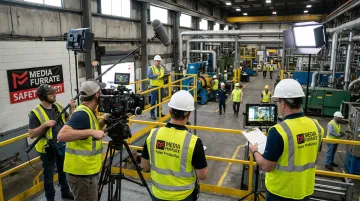
The company works directly with clients' safety managers and legal teams during the scripting phase to ensure technical accuracy before a single camera is unpacked.
Keep Modules Short and Specific
Scripting and structure only get you so far if the format itself works against retention. Research from a 2014 study of 6.9 million MOOC video-watching sessions found that videos under approximately 6 minutes showed substantially higher engagement than longer formats. For safety training, that means building separate modules — one for chemical handling, one for PPE by task, one for equipment operation and LOTO, one for emergency procedures — rather than a single 45-minute orientation video.
Each module covers one hazard category thoroughly. Employees can revisit a specific module before performing a task for the first time, turning a one-time orientation into a reference they'll actually use.
How to Implement Safety Training Videos in Your Print Shop
A video library without a rollout plan doesn't protect anyone. Here's how to make the content work:
Before the first shift:
- All new hires complete core safety modules before stepping onto the production floor
- Completion is documented with a dated sign-off — whether through an LMS, a shared digital log, or a signed acknowledgment sheet
Ongoing schedule:
- Annual refresher training at minimum for all employees
- Retraining required when new equipment is installed, chemical products change, or procedures are updated
- Additional training after any workplace incident — OSHA's LOTO standard (1910.147) specifically requires retraining when deficiencies are identified
Reinforce beyond the screen: Post PPE requirement signs, chemical handling summaries, and hazard reminders at the relevant workstations. Visual cues on the floor reinforce what employees watched in training, creating a consistent safety culture rather than a one-time event.
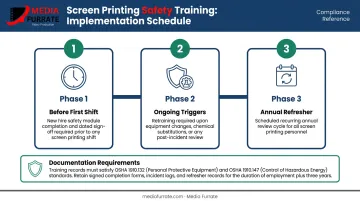
Documentation is not optional. OSHA's PPE standard (1910.132) requires written certification that each employee received and understood training. LOTO (1910.147) inspection certifications must identify the equipment, date, employees included, and inspector.
Video-based training makes meeting those requirements straightforward: the record shows who watched what and when.
Frequently Asked Questions
What safety precautions should be taken during screen printing?
Wear appropriate PPE for each task : gloves and goggles for chemical handling, a respirator when using aerosol adhesives or solvents. Keep workstations clear of slip hazards and misplaced blades, maintain adequate ventilation in ink and chemical areas, and ensure every employee completes equipment training before operating presses or curing units.
What are the hazards of screen printing?
The main categories are chemical exposure from inks, emulsions, and solvents; ergonomic injuries from repetitive squeegee motion and manual lifting; burn risks from flash cure units and conveyor dryers; and electrical hazards from automatic press equipment. These hazards exist across all shop sizes, not just large operations.
What are the steps in the screen printing process?
The process runs from artwork creation through screen preparation, exposure and stencil development, ink preparation, printing, curing, and reclaiming. Chemical hazards appear in preparation and reclaiming stages, heat hazards during curing, and ergonomic risks throughout press operation.
What PPE is required for screen printing?
At minimum: chemical-resistant gloves, safety glasses or goggles at the press, a face shield during high-pressure screen reclaiming, and a NIOSH-approved respirator with organic vapor cartridges for aerosol adhesive work. Closed-toe shoes are required for all floor tasks.
How often should screen printing employees receive safety training?
Before starting work, then at minimum annually. Additional retraining is required when equipment changes, chemical products are substituted, procedures are updated, or after any workplace incident. Video-based training makes it straightforward to document completion and keep that schedule on track.
Why are training videos better than printed safety manuals for screen printers?
Video demonstrates correct technique visually , which static text cannot replicate for equipment procedures or PPE donning. It's accessible to employees across literacy levels and language backgrounds, can be paused and rewound for self-paced review, and delivers a consistent experience regardless of who conducts onboarding on a given day.